
Knowing how to check your router balance on Airtel is very important—especially if you use your router for Internet access on a daily basis for your work online or gaming. By checking your router balance, you stay updated with your data balance which helps you to know when to resubscribe or manage the available data. This article would show you how to check your router balance on Airtel.
Airtel Router Overview
The Airtel router uses an Airtel SIM card to provide Internet access to connected users through the use of WiFi. It’s used mostly in offices, homes, and at several business settings where access to the Internet is needed for the business to operate. It’s a great device because several computers and other devices can connect at once without any issue—ensuring all the devices work perfectly while connected to its server.
Interestingly, to be in full control of how your data works, you need to know your data balance. This will help you know when to purchase another bundle or to manage the remaining balance. This will ensure you carry out tasks online efficiently because you have a track record of how much data you’ve used for your Airtel router.
Read More: How to Stop Automatic Data Renewal on Airtel
How to Check Router Balance on Airtel
Checking your router balance on Airtel is very easy and takes few seconds to complete. Once request is sent, you would receive a message with your router balance. You can check your balance either through USSD code and router admin page;
Checking Balance Through the use of USSD Code
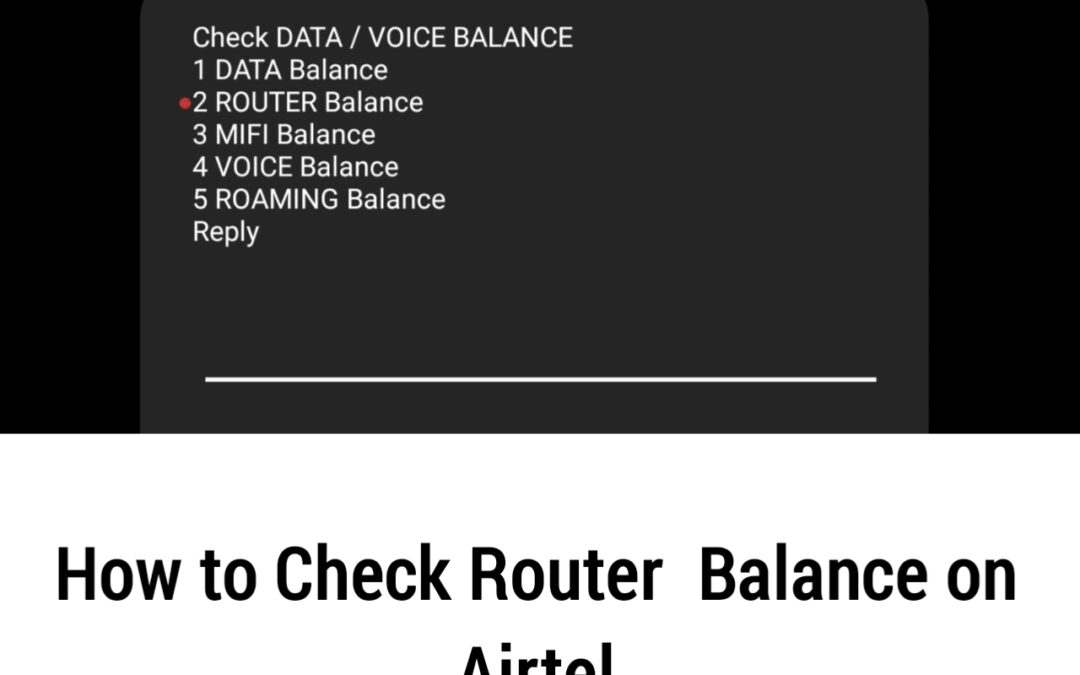
To check your balance using the USSD code option, remove your SIM card and inset it in your mobile phone, dial *323# and select the “Router Balance” option and follow the on-screen instructions to know your balance.
Checking Balance Through Router Admin Page
To check your router balance through the use of router admin page, connect your device to the router’s WiFi and enter 192.168.1.1. on your browser. Login to the admin dashboard and access your data balance.
Read More: How to Transfer Airtime from MTN to MTN
Frequently Asked Questions (FAQs)
Does the Airtel App support Airtel router SIMs?
Yes, the Airtel App supports Airtel router SIM cards. You need to link the router SIM number to the app. Once linked successfully, you can monitor data balance, active plans, and expiry dates directly from your phone with ease.
Why is my Airtel router balance not showing correctly?
This usually happens due to network delay, expired data plans, or dashboard refresh issues. Restart your router and refresh the admin page. If the problem continues, check the balance using USSD on a phone or confirm your subscription through the Airtel App.
How often should I check my Airtel router balance?
It is best to check your Airtel router balance daily or every few days, especially if multiple devices are connected. Regular checks help you track usage, avoid sudden data exhaustion, and plan timely renewals for smooth and uninterrupted internet access.
What is the code to check Airtel router balance?
There is no direct USSD code that works on the router itself. To check your Airtel router balance using USSD, remove the SIM from the router and insert it into an Airtel mobile phone. Dial *323# and follow the prompts to view your remaining data balance.
Can I check Airtel router balance without removing the SIM?
Yes, you can check your Airtel router balance without removing the SIM by using the router admin page or the Airtel App. Simply connect to the router Wi-Fi, log in to the dashboard at 192.168.1.1, or view the balance through the app.
Can I receive low data balance alerts on my Airtel router?
Airtel does not always send automatic low data alerts for router SIMs. However, some routers show usage warnings on the admin dashboard. You can also enable data usage tracking on connected devices or regularly check your balance using the MyAirtel App to avoid unexpected data exhaustion.
Do you know you can get budget-friendly, reliable, strong and fast data, airtime, TV subscriptions, Examination pins amd more on Xxdata? Yes! You can. Click on the link below to get started on our website.

Final Thought
Knowing how to check your Airtel router balance is very important as you get to know when to purchase another bundle, how at which rate you’re consuming the data and how to manage the data.
Having known how to check your Airtel router balance, you can easily do that check and track your data balance before usage and after usage. Incase you want to resubscribe your data, we sell budget-friendly data on Xxdata. You can visit our website to get yours.