
Transferring airtime from one MTN number to another MTN number is one of the easiest ways to help your friends and loved ones with airtime to make calls or subscribe to data bundles or other value-added services on MTN. MTN allows you to share your airtime with your loved ones just by following simple steps. In this article, you would learn how to transfer airtime from one MTN to another MTN number
MTN Share Service Overview
MTN share service is a package offered by MTN that allows MTN users to share their airtime to other MTN users from their airtime balance making the beneficiaries to enjoy part of their airtime at no cost. You may not have access to airtime at all times and find yourself in an emergency where you need urgent airtime on your MTN SIM card.
This offer makes airtime available for users at the time of need—as you easily get airtime or share part of your airtime to your loved ones at almost zero cost. Interestingly, to share your airtime, you need an active MTN SIM, enough airtime balance, and a PIN—which serves as a security used by authorized owners to automate an airtime transfer.
Read More: How to Deactivate All GLO Subscriptions at Once
How to Change the Default MTN Share Transfer PIN
Before you can share your airtime with another MTN user, you need a PIN which shows you’re the authorized user of the SIM card. MTN assigned a default pin to you immediately you register for the MTN share service which you can change afterwards to a more secured PIN only you can use to authorize airtime. transfer.
The default pin is 0000 (4 digit pin). You can change the default pin by dialing *321*0000*new pin*new pin#. Let’s assume your pin is “2370”, then you would dial *321*0000*2370*2370#. You would receive a notification that your PIN has been changed successfully.
How to Transfer MTN Airtime
MTN provides multiple ways in which you can send airtime from your SIM card to another MTN line; you can do that either through USSD code or through the myMTN app. You choose the best that suits your preferences.
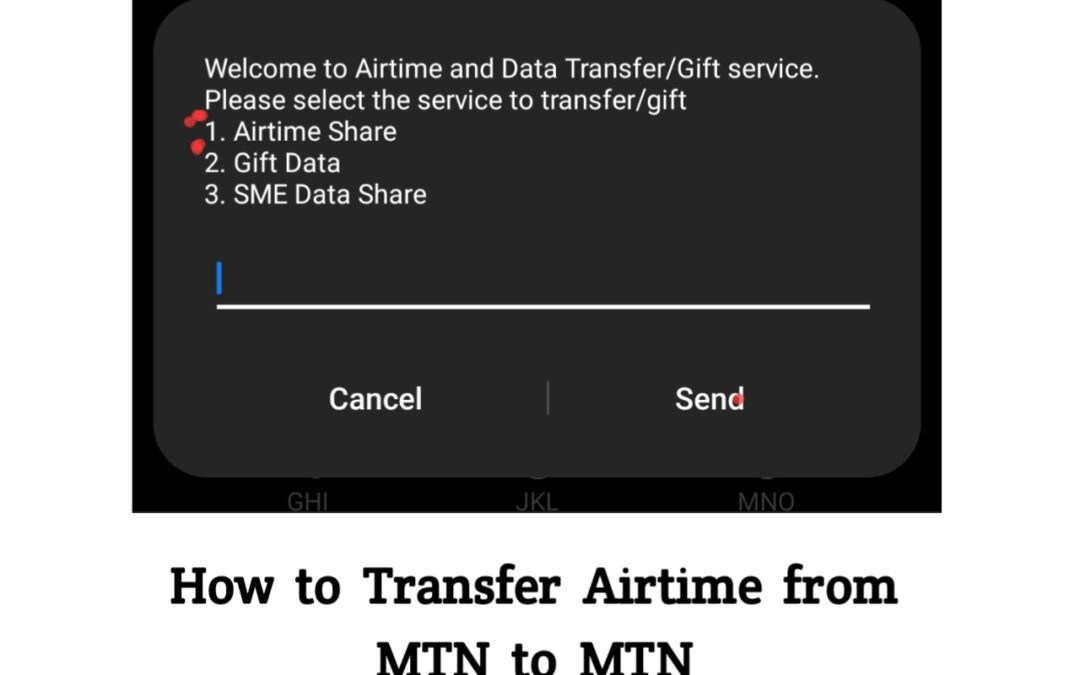
If you’re using the USSD code, dial *321# and select the first option, “Airtime share” and follow the on-screen instructions to complete the airtime transfer process. You would receive a notification if successful and the beneficiary will receive the airtime immediately.
If you’re using myMTN app, log into your account and navigate to MTN share, insert the number you want to share the airtime with and put your PIN to automate the airtime transfer.
To reset your MTN transfer PIN, dial *321# and choose the “MTN Share”, select “Reset PIN” and follow the remaining instructions.
You might encounter some issues which occur because of network problems; this include incorrect PIN insufficient balance and sometimes and rarely, numbers not eligible.
Read More: How to Convert MTN Reward Points to Airtime
Frequently Asked Questions (FAQs)
Can I transfer airtime from MTN to another network?
No. MTN Share works only between MTN lines. You cannot send airtime from MTN to Glo, Airtel, or 9mobile. If you need to support someone on another network, you must purchase recharge directly for that network or use third-party platforms that sell multi-network airtime.
Is it safe to transfer airtime using USSD codes?
Yes, USSD codes are secure because they operate directly through the network. However, safety depends on keeping your PIN confidential. Avoid typing your PIN in the presence of others and never share it through messages or calls, as scammers often exploit such situations.
Can I transfer airtime if my line is on a promo plan?
Yes, you can still transfer airtime even if your MTN line is on a promo plan, as long as the airtime is regular credit and not bonus or special bundles. Bonus credits cannot be shared, so only usable balance qualifies for transfers.
How much airtime can I transfer on MTN?
MTN allows transfers between ₦50 and ₦5,000 per transaction, depending on your line type and network conditions.
Can I transfer airtime without a PIN?
No. A valid transfer PIN is required for every MTN airtime transfer to protect your account from unauthorized use.
Does MTN charge a fee for airtime transfer?
MTN does not charge a transfer fee, but the recipient receives slightly less due to network deductions in some cases. The amount deducted varies, and it is usually small. The service is still free for most transactions, making it a convenient way to share credit.
On Xxdata, we sell budget-friendly, reliable, and fast data, airtime, TV subscriptions and Examination pins, all available on our website. Visit our website to using this link to get started.
Final Thought
MTN share is an interesting package brought up by MTN to enable users share airtime among themselves at zero cost making them have access to airtime at the time of need. Having read this article, you can easily transfer MTN airtime from one MTN number to another MTN number with ease.